Translating any recipe into Chefclub cups
A converter that turns grams and millilitres into mascot cups, so kids can cook without scales or maths.
Context
Chefclub launched Chefclub Kids, a range for cooking as a family. Its flagship product: a set of measuring cups, each featuring one of the brand's mascots.
Each mascot stands for a precise quantity. The mouse, for example, equals 50 g. No more scales: the child fills the right cup, the right number of times.
Chefclub Kids books give quantities directly in cups, as comic-style illustrations. A child who can't read yet can follow the recipe on their own.
Problem
The cups only come with a handful of illustrated recipes. As soon as a family wants to cook something else (grandma's recipe, a cookbook, a website), quantities go back to grams, millilitres or kilos.
For the child, these units mean nothing. For the adult, translating 175 g of flour into mascot cups takes a tedious calculation. As a result, the product loses its appeal as soon as you step outside the book.
Objectives
Let adults translate any recipe into Chefclub cups in a few seconds.
- Convert metric units (g, kg, ml, cl, l) into combinations of mascot cups: 100 g becomes 2 mice.
- Make the tool instant: an adult should understand how it works without instructions.
- Extend the product's use beyond the recipes provided, and with it its perceived value.
- Stay within the Chefclub Kids universe so the converter feels like a natural extension of the cups.
My role
UX/UI designer on the whole converter, from the conversion logic to the final screens.
- Defining the calculation rules and edge cases
- User journey and features
- Interface design within the Chefclub Kids art direction
Design process
The challenge: hiding fairly complex calculation logic behind an interface a parent can pick up in a few seconds.
1. Defining the calculation rules
Before drawing anything, we had to decide how the tool converts a quantity.
- Breakdown: a quantity becomes a combination of cups, starting from the largest. For example, the flour for pancakes becomes one pig cup and one cat cup.
- Accepted units: weights (g, kg) and volumes (ml, cl, l).
2. Building the journey
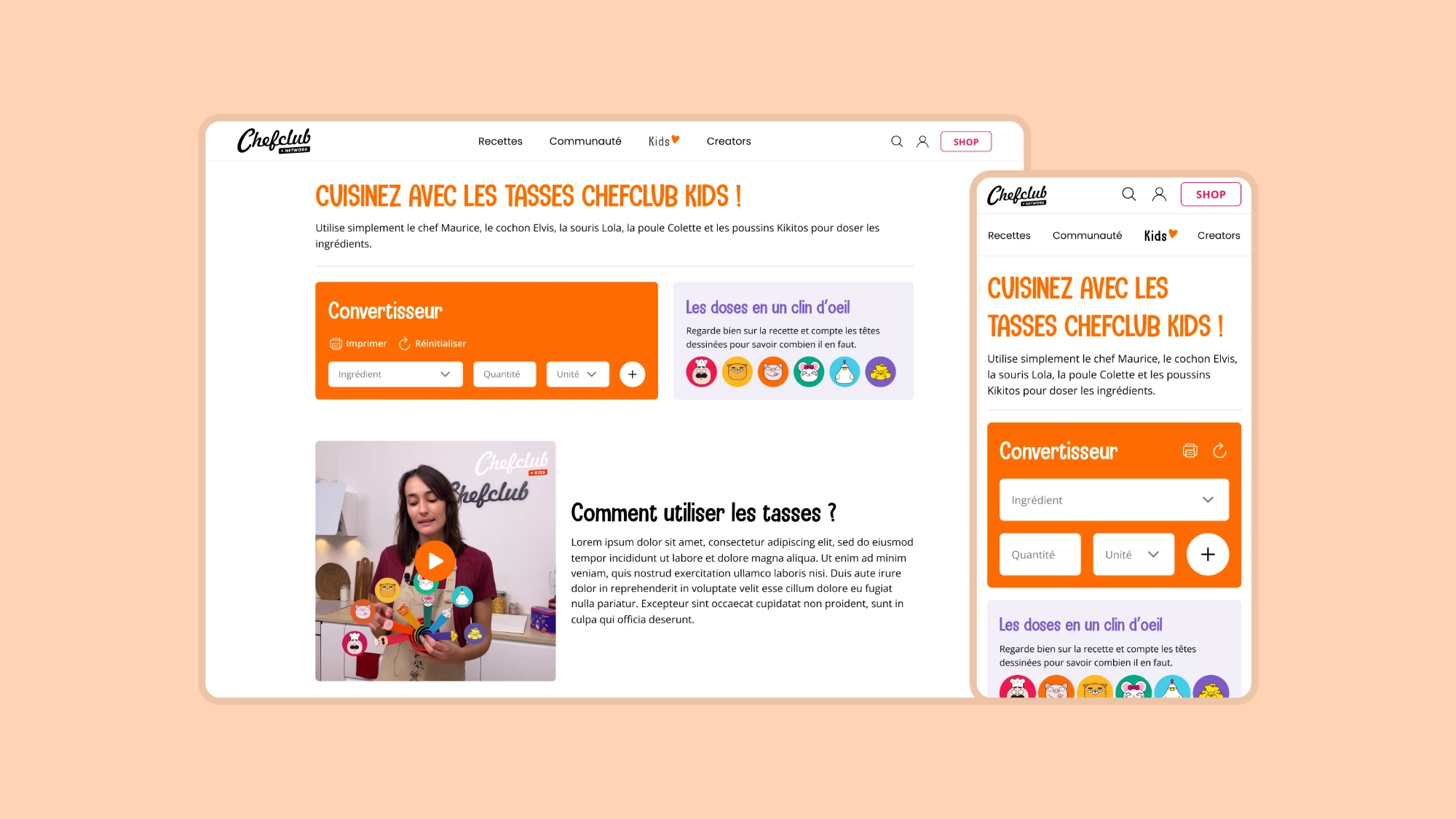
The journey follows the way a parent reads a recipe: one ingredient at a time.
- Choose an ingredient from a list
- Enter the recipe's quantity and unit
- See the result in cups, illustrated by the mascots
- Add the next ingredient to build the full recipe
- Print or save as PDF to have it in the kitchen
3. Features
- Ingredient selection: a list to avoid typing errors and apply the right calculation rule.
- Adding ingredients: you translate a whole recipe, not a single quantity.
- Print and PDF export: the translated recipe leaves the screen and goes to the kitchen, at child height.
- Reset: start over in one click for a new recipe.
- How it works: a short guide to reassure first-time users.
4. Staying in the Chefclub Kids universe
The result isn't shown as numbers but with the mascots. The printed sheet follows the logic of the books: character heads to count, which the child reads without knowing how to read.

Results
The converter is live and featured in the Kids section of the Chefclub website.
- The cups can now be used with any recipe, not just the ones in the book.
- The tool extends the product experience on the website and creates a link between the shop and the content.